
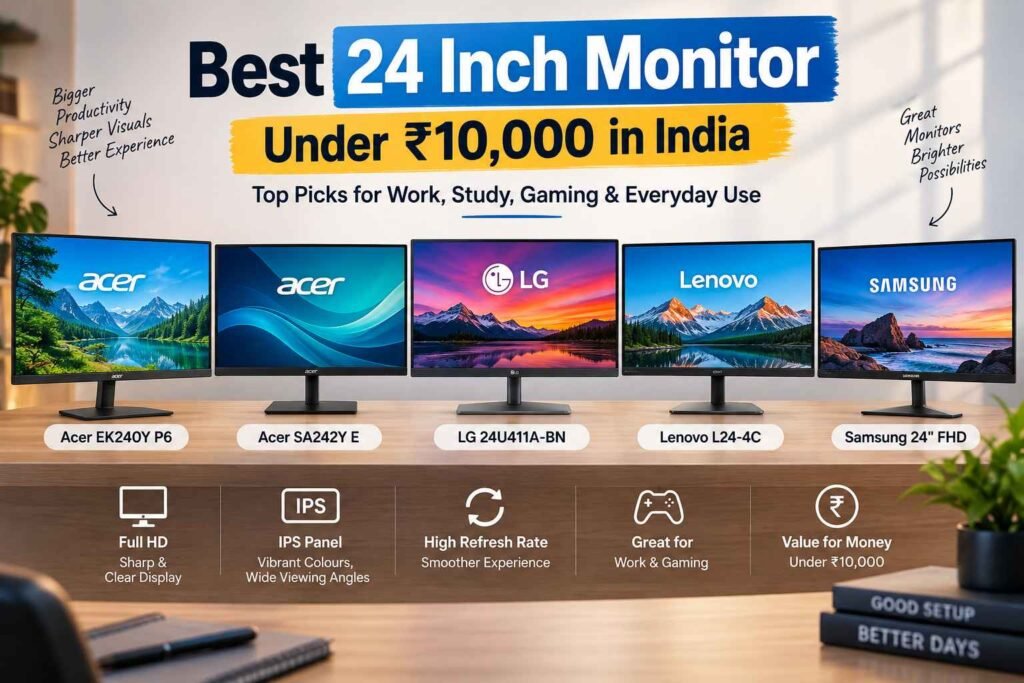
Finding the best 24 inch monitor under Rs 10,000 in India is easier than ever. Whether you need a monitor for work from home, studying, office tasks, content consumption, casual gaming, or everyday computing, there are several excellent options available from brands such as Acer, LG, Lenovo, and Samsung.
A 24-inch Full HD monitor offers a great balance between screen size, sharpness, desk space, and affordability. Most of the options in this price range now feature IPS panels, Full HD resolution, slim bezels, higher refresh rates, and AMD FreeSync support, making them suitable for both productivity and entertainment.
In this guide, we have shortlisted some of the best 24 inch monitors under Rs 10,000 in India, including the Acer EK240Y P6, Acer SA242Y E, LG 24U411A-BN, Lenovo L24-4C, and Samsung’s 24-inch Full HD 100Hz monitor.
Note: Monitor prices and availability can change frequently. Always check the latest price before purchasing.
Quick Comparison: Best 24 Inch Monitors Under Rs 10,000
| Monitor | Screen | Resolution | Refresh Rate | Panel | Best For |
|---|---|---|---|---|---|
| Acer EK240Y P6 | 23.8-inch | Full HD | Up to 144Hz | IPS | Gaming & value |
| Acer SA242Y E | 23.8-inch | Full HD | 100Hz | IPS | Office & everyday use |
| LG 24U411A-BN | 24-inch | Full HD | 120Hz | IPS | Work & entertainment |
| Lenovo L24-4C | 23.8-inch | Full HD | 144Hz | IPS | Gaming & productivity |
| Samsung 24-inch FHD | 24-inch | Full HD | 100Hz | — | Office & general use |
1. Acer EK240Y P6 – Best Overall 24 Inch Monitor Under Rs 10,000
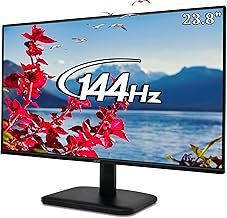
The Acer EK240Y P6 is one of the most attractive choices if you’re looking for a feature-packed 24 inch monitor under Rs 10,000.
With a 23.8-inch Full HD IPS display, the monitor provides a good combination of image quality and viewing angles. Its high refresh rate makes it particularly interesting for users who want to use the same monitor for productivity and casual gaming.
The monitor also supports features such as AMD FreeSync, making gameplay smoother when paired with a compatible graphics card.
Key Features
- 23.8-inch IPS display
- Full HD 1920 × 1080 resolution
- Up to 144Hz refresh rate
- Fast response time
- AMD FreeSync support
- HDMI and VGA connectivity
- Slim design
Who Should Buy It?
The Acer EK240Y P6 is a strong choice for students, office users, casual gamers, and anyone looking for maximum features at a budget price.
Check the latest price:
Buy Acer EK240Y P6 on Amazon
2. Acer SmartChoice SA242Y E – Best Budget IPS Monitor
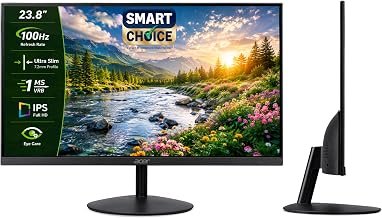
If your priority is an affordable, slim and reliable display for everyday computing, the Acer SmartChoice SA242Y E deserves a place on your shortlist.
It features a 23.8-inch Full HD IPS panel and a 100Hz refresh rate, which is an upgrade over traditional 60Hz monitors. The higher refresh rate can make scrolling, animations and general desktop movement feel smoother.
Acer also positions this monitor around features such as a ZeroFrame design, VisionCare technologies, AMD FreeSync and a fast response mode.
Key Features
- 23.8-inch Full HD IPS display
- 1920 × 1080 resolution
- 100Hz refresh rate
- 1ms VRB response
- AMD FreeSync
- Ultra-slim ZeroFrame design
- HDMI connectivity
- Eye-care features
Who Should Buy It?
This is a good option for office work, online classes, browsing, streaming, spreadsheets and general home computing.
Check the latest price:
Buy Acer SA242Y E on Amazon
3. LG 24U411A-BN – Best 24 Inch Monitor for Work and Entertainment
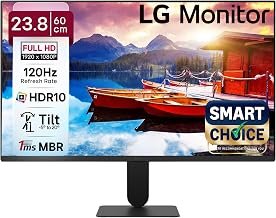
LG is another brand worth considering when shopping for a 24 inch Full HD monitor under Rs 10,000.
The LG 24U411A-BN comes with a 24-inch Full HD IPS display and a 120Hz refresh rate, making it a versatile option for both productivity and entertainment.
The combination of a Full HD IPS panel and higher refresh rate makes the monitor suitable for office applications, web browsing, video consumption and casual gaming.
Key Features
- 24-inch display
- Full HD 1920 × 1080 resolution
- IPS panel
- 120Hz refresh rate
- HDMI connectivity
- VGA connectivity
- Slim, virtually borderless design
Who Should Buy It?
Choose the LG 24U411A-BN if you want a balanced monitor for office work, entertainment, studying and casual gaming.
Check the latest price:
Buy LG 24U411A-BN on Amazon
4. Lenovo L24-4C – Best 144Hz 24 Inch Monitor
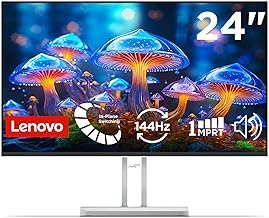
The Lenovo L24-4C is arguably one of the most feature-rich options in this list, especially if gaming and smooth motion are important to you.
Lenovo lists the L24-4C with a 23.8-inch Full HD IPS panel, 144Hz refresh rate, 99% sRGB coverage, AMD FreeSync and 1ms MPRT response time. It also includes integrated 2 × 3W speakers.
The monitor uses a four-sided near-edgeless design and offers HDMI and VGA connectivity. Lenovo also specifies a 178° horizontal and vertical viewing angle.
Key Features
- 23.8-inch IPS display
- Full HD 1920 × 1080 resolution
- 144Hz refresh rate
- 1ms MPRT response time
- 99% sRGB coverage
- AMD FreeSync
- 2 × 3W integrated speakers
- HDMI and VGA
- 100 × 100mm VESA support
- Near-edgeless design
Who Should Buy It?
The Lenovo L24-4C is particularly appealing to casual gamers, students, professionals and users who want a high-refresh-rate monitor that can handle both work and entertainment.
Check the latest price:
Buy Lenovo L24-4C on Amazon
5. Samsung 24-inch Full HD 100Hz Monitor – Reliable Everyday Choice
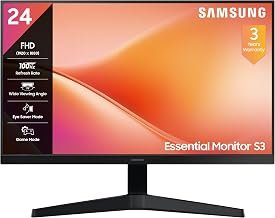
Samsung is one of the most recognised display brands, and its 24-inch Full HD 100Hz monitor is worth considering for users who want a straightforward display from an established manufacturer.
The 100Hz refresh rate provides smoother motion compared with conventional 60Hz displays, making it useful for everyday browsing, office applications and entertainment.
Key Features
- 24-inch display
- Full HD 1920 × 1080 resolution
- 100Hz refresh rate
- Slim design
- Suitable for office and home use
- Full HD picture quality
Who Should Buy It?
This Samsung monitor is a good choice for office users, students, home users and anyone looking for a simple Full HD monitor from a well-known display brand.
Check the latest price:
Buy Samsung 24-inch FHD 100Hz Monitor on Amazon
Which Is the Best 24 Inch Monitor Under Rs 10,000?
The right monitor depends on how you intend to use it.
🏆 Best Overall: Acer EK240Y P6
The Acer EK240Y P6 offers an excellent combination of IPS display quality, Full HD resolution, high refresh rate and gaming-friendly features. It is one of the strongest all-round choices in this budget.
🎮 Best for Gaming: Lenovo L24-4C
With its 144Hz refresh rate, 1ms MPRT, AMD FreeSync and 99% sRGB coverage, the Lenovo L24-4C is an excellent option for users who want smoother gaming without moving into a much higher price category.
💼 Best for Office Work: Acer SA242Y E
The Acer SA242Y E is a practical choice for work from home, spreadsheets, browsing, video meetings and general productivity.
🎬 Best for Work + Entertainment: LG 24U411A-BN
The LG monitor’s combination of a Full HD IPS display and 120Hz refresh rate makes it a versatile option for users who switch between work, streaming and casual gaming.
⭐ Best Brand-Focused Choice: Samsung 24-inch FHD 100Hz
If brand familiarity and straightforward everyday use are your priorities, Samsung’s 24-inch Full HD 100Hz monitor is worth considering.
What to Look for When Buying a 24 Inch Monitor Under Rs 10,000
Before buying a budget monitor, don’t focus only on the screen size. The following specifications can make a significant difference to your experience.
1. IPS vs VA vs TN Panel
For most users, an IPS monitor is preferable in this price range because IPS panels generally provide good viewing angles and consistent colours.
If you’re primarily looking for contrast and deeper blacks, VA panels can also be worth considering.
2. Full HD Resolution
For a 24-inch display, 1920 × 1080 Full HD resolution remains a practical choice.
It provides enough pixel density for everyday work, browsing, videos, presentations and gaming without requiring an expensive graphics card.
3. Refresh Rate
Traditional monitors commonly use a 60Hz refresh rate, while many modern budget monitors now offer 100Hz, 120Hz or even 144Hz.
A higher refresh rate can make:
- Scrolling smoother
- Animations look more fluid
- Gaming feel more responsive
- Cursor movement appear smoother
For general users, 100Hz is already a noticeable upgrade from 60Hz.
4. Response Time
Gamers should pay attention to response time. A lower response time can help reduce visible ghosting and motion blur.
However, don’t choose a monitor solely because it advertises an extremely low response time. Panel quality, refresh rate and real-world performance also matter.
5. AMD FreeSync
If you use an AMD graphics card, FreeSync can help reduce screen tearing and improve gaming smoothness.
Some monitors in this list, including the Acer and Lenovo options, offer AMD FreeSync support.
6. Connectivity
Check whether the monitor includes the ports you actually need.
Common connections include:
- HDMI
- VGA
- DisplayPort
- 3.5mm audio output
- USB
For a basic laptop or desktop setup, HDMI is usually the most important connection to check.
7. VESA Mount Support
If you’re planning a dual-monitor setup or want to mount your monitor on an adjustable arm, check for VESA compatibility.
The Lenovo L24-4C, for example, supports a 100 × 100mm VESA mount.
Is a 24 Inch Monitor Good for Work From Home?
Yes. A 24-inch Full HD monitor is an excellent size for work from home.
It provides significantly more workspace than a typical laptop screen while remaining compact enough for most desks.
A 24-inch monitor is particularly useful for:
- Microsoft Excel and spreadsheets
- Google Docs
- Video conferencing
- Digital marketing
- Web browsing
- Programming
- Content writing
- Accounting
- Online classes
If your work involves large spreadsheets, video editing or multiple applications simultaneously, you may eventually benefit from a larger 27-inch or ultrawide monitor.
Is 24 Inch Full HD Good for Gaming?
Yes. A 24-inch Full HD monitor can be an excellent gaming display, particularly for competitive and casual gaming.
In fact, 1080p is relatively easy for many GPUs to drive at high refresh rates. A 100Hz, 120Hz or 144Hz monitor can therefore provide a smoother gaming experience than a conventional 60Hz display.
For competitive gaming, models such as the Acer EK240Y P6 and Lenovo L24-4C stand out because of their higher refresh rates and gaming-oriented features.
Frequently Asked Questions
Which is the best 24 inch monitor under Rs 10,000 in India?
The Acer EK240Y P6 is one of the best overall choices because it combines a 23.8-inch IPS Full HD display with a high refresh rate and gaming-friendly features. The Lenovo L24-4C is another excellent option, particularly for users who prioritise 144Hz gaming and colour coverage.
Which is the best 24 inch IPS monitor under Rs 10,000?
The Acer EK240Y P6, Acer SA242Y E, LG 24U411A-BN and Lenovo L24-4C are strong IPS options in this price category.
Is 100Hz better than 60Hz?
Yes. A 100Hz monitor can provide noticeably smoother scrolling, cursor movement and animations compared with a 60Hz display.
Is 24 inch enough for office work?
Yes. A 24-inch Full HD monitor is an excellent size for everyday office work, browsing, documents, spreadsheets and video conferencing.
Which is better for gaming, 100Hz or 144Hz?
A 144Hz monitor can provide smoother motion than a 100Hz monitor, particularly in fast-paced games. However, the difference is less dramatic than the jump from 60Hz to 100Hz, and your PC also needs to be capable of producing sufficiently high frame rates.
Should I buy a 24 inch or 27 inch monitor?
Choose a 24-inch Full HD monitor if you have limited desk space, want a sharper-looking 1080p image at a reasonable viewing distance, or have a budget below Rs 10,000.
A 27-inch monitor is worth considering if you want a larger workspace, but for 27 inches, moving to a higher resolution such as 1440p can be preferable if your budget allows.
Final Verdict
If you’re searching for the best 24 inch monitor under Rs 10,000 in India, there are several excellent options available.
The Acer EK240Y P6 is our pick for the best all-round value, while the Lenovo L24-4C is particularly attractive for users who want a 144Hz display and gaming features.
For everyday office and home use, the Acer SA242Y E is a practical budget option. The LG 24U411A-BN offers a good balance between productivity and entertainment, while Samsung’s 24-inch Full HD 100Hz monitor is worth considering if you prefer the Samsung ecosystem and brand.
Ultimately, the best monitor depends on your priorities. For gaming, prioritise refresh rate and response time. For office work, focus on panel quality, viewing comfort and ergonomics. For general use, an IPS Full HD monitor with a 100Hz-or-higher refresh rate is an excellent sweet spot.
Prices and availability can change, so check the latest listing before purchasing.